Facebook Ads Metrics Incorrect or Missing? Complete Troubleshooting Guide (2026)
Facebook Ads Manager provides essential metrics for evaluating ad effectiveness, including conversions, spend, and ROAS. Custom conversions and Facebook Pixel help track specific user actions. Common issues include missing or inaccurate data due to new campaigns, low spending, small audiences, or attribution window discrepancies. Troubleshooting steps involve reviewing targeting settings, checking ad placements, verifying tracking implementation, and allowing sufficient time for data collection.

If your Facebook Ads metrics look incorrect, incomplete, or simply don’t match your store data, you’re not imagining things. In 2026, inaccurate Meta Ads reporting is one of the most common and most expensive problems ecommerce brands face.
Purchases go missing. ROAS drops overnight. Ads get paused even though Shopify revenue looks fine.
In this guide, we’ll break down why Facebook Ads metrics are often wrong, how to troubleshoot the most common causes, and what actually fixes attribution issues long-term.

Why Facebook Ads Metrics Are Often Incorrect in 2026
The core issue is simple. Facebook was built on browser-based tracking, but the internet no longer works that way.
Apple’s iOS privacy changes mean a large share of users explicitly opt out of tracking. When that happens, the Facebook Pixel cannot store cookies, cannot follow users across sessions, and cannot reliably attribute purchases back to ads.
On top of that, ad blockers increasingly prevent the Meta Pixel from firing at all. Even when a user clicks an ad and completes a purchase, the conversion event may never reach Facebook.
The result is structural underreporting. Not a setup mistake, but missing data by design.
To compensate, Facebook uses statistical modeling. That’s why numbers change retroactively, conversions appear delayed, and results never fully match your backend.
Common Symptoms of Facebook Ads Reporting Problems
Most advertisers notice the same patterns.
Shopify or WooCommerce shows significantly more revenue than Facebook Ads Manager. ROAS in Meta looks worse than reality. Performance seems to fluctuate without any meaningful campaign changes. iOS traffic appears to convert poorly compared to desktop or Android. Scaling campaigns suddenly causes results to collapse.
These aren’t random issues. They all point to lost attribution.
How to Troubleshoot Facebook Ads Metrics Step by Step
The first thing to do is compare your store revenue with what Facebook reports over the same date range. Small gaps are normal. Large gaps are a signal that conversions are not being sent back correctly.
Next, check Meta Events Manager. If Purchase events are missing, delayed, or flagged with warnings, Facebook’s optimization engine is flying blind. Even when events show up, low match quality means Facebook struggles to connect conversions to real users.
Domain verification and aggregated event settings are another frequent source of confusion. Changes here can reset learning, remove events from reporting, or deprioritize purchases without you noticing.
It’s also worth checking whether multiple pixels or apps are firing events at the same time. Duplicate or conflicting events don’t just inflate numbers. They can also cause Facebook to discard data entirely.
Finally, look at performance by browser and device. If conversions drop sharply on Safari or iOS, privacy restrictions are almost certainly the root cause.
Why Fixing the Facebook Pixel Is No Longer Enough
Many guides stop at “reinstall the pixel” or “check event firing.” That advice is outdated.
Even a perfectly installed Meta Pixel cannot track users who opt out, cannot bypass ad blockers, and cannot reliably connect cross-device journeys. Pixel troubleshooting fixes technical errors, not the underlying data loss.
In 2026, the limitation isn’t your setup. It’s the tracking method itself.
The Shift to Server-Side and First-Party Tracking
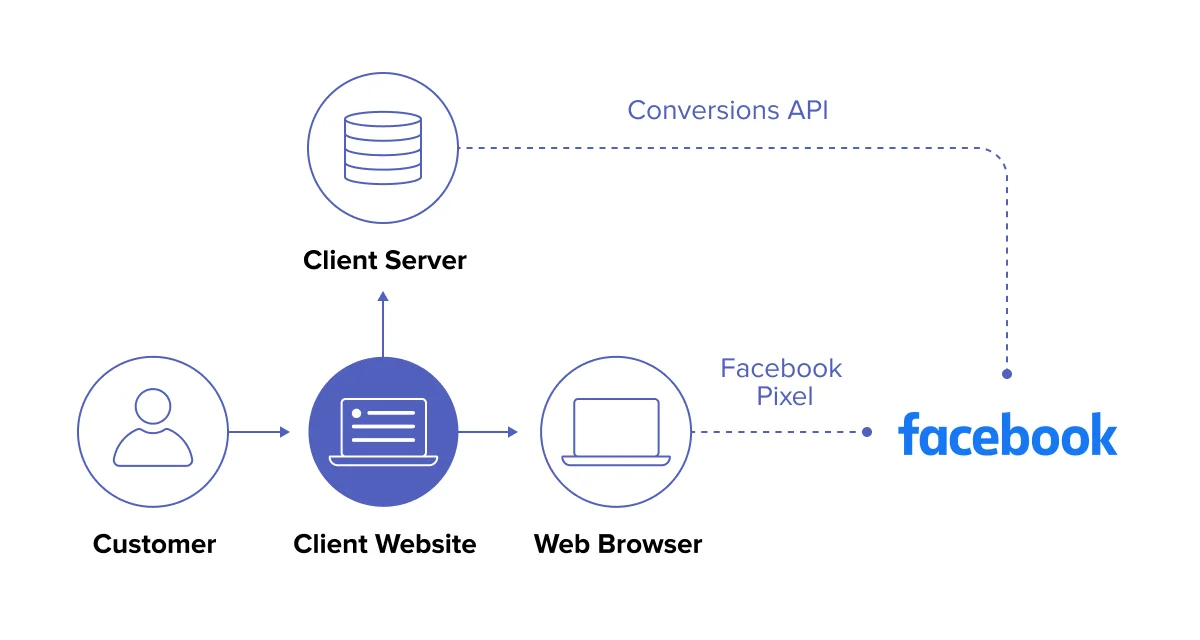
The only reliable way to fix missing or incorrect Facebook Ads metrics is to move tracking off the browser and onto the server.
Server-side tracking collects conversion data directly from your store instead of relying on cookies or client-side scripts. That data is then sent back to Facebook in a privacy-compliant way, using first-party signals that are far more resilient to blocking.
This approach dramatically increases attribution accuracy and gives Facebook’s algorithm the signals it needs to optimize properly.
How wetracked.io Fixes Incorrect Facebook Ads Metrics
wetracked.io is built specifically to solve this problem.
Instead of relying on the browser, it tracks purchases server-side, enriches the data with first-party signals, and pushes clean, accurate conversions directly into Meta Ads Manager.
That means purchases are attributed even when users have ad blockers enabled or tracking turned off on iOS. There’s no need for extra dashboards or manual comparisons, because the corrected data appears directly inside Facebook Ads Manager.
According to internal product benchmarks, merchants typically move from around 40 percent attribution accuracy to near-complete visibility after switching to this approach, as outlined in wetracked.io’s documentation .
Why Accurate Facebook Ads Metrics Matter More Than Ever
Inaccurate reporting doesn’t just affect your confidence. It actively hurts performance.
Facebook’s algorithm optimizes based on the data it receives. If conversions are missing or delayed, it learns the wrong patterns, scales the wrong ads, and shuts down campaigns that are actually profitable.
Clean data leads to better optimization, more stable performance, and the confidence to scale without guessing.
When You Should Stop Troubleshooting and Change the System
If your store revenue consistently exceeds what Facebook reports, if iOS traffic looks broken, or if you don’t fully trust Ads Manager anymore, the issue isn’t something you can debug away.
At that point, continuing to tweak pixels is wasted effort. The fix is architectural, not tactical.
Final Takeaway
Facebook Ads metrics being incorrect or missing is no longer an exception. It’s the expected outcome of browser-based tracking in a privacy-first world.
If you want reliable attribution and ads that actually optimize on real revenue, server-side first-party tracking isn’t a “nice to have.” It’s the new baseline.
Effective performance tracking is crucial for optimizing Facebook ad campaigns. Marketers should regularly monitor key metrics and be prepared to troubleshoot common issues such as missing data or discrepancies between reported and actual performance. By understanding the reasons behind these challenges and implementing appropriate solutions, advertisers can ensure more accurate reporting and make data-driven decisions to improve their campaign effectiveness and overall return on ad spend.


