Google Ads Shopify Integration (2026): Track Every Sale Correctly
The Google Ads pixel is an essential tool for businesses to enhance their digital marketing strategies. By embedding a small piece of code on their websites, businesses can track user activities such as page visits, clicks, and conversions. This data is then communicated back to the Google Ads dashboard, allowing for the optimization of ad performance. The setup involves adding the code to web pages and configuring it in the Google Ads Manager. Tools like Wetracked.io can further enhance tracking accuracy, ensuring reliable data flow from ad clicks to sales. The insights gained enable precise targeting and efficient budget allocation, ultimately improving advertising effectiveness.
If you’re running Google Ads for your Shopify store and your numbers don’t line up, you’re not alone. In 2026, most Shopify merchants using the default Google Ads integration are not tracking all sales correctly, even when everything looks “set up properly.”
Conversions go missing. ROAS looks worse than it really is. Smart bidding struggles to scale.
In this guide, we’ll explain how the Google Ads–Shopify integration actually works, why it often breaks down, and what you need to do to track every sale accurately in a privacy-first world.

How the Google Ads Shopify Integration Works (In Theory)
At a high level, the standard setup looks simple. You connect Shopify to Google Ads, install a conversion tag or use the Google & YouTube app, and purchases should appear in your Ads account.
In practice, this setup relies heavily on browser-based tracking. Google needs cookies, user consent, and uninterrupted client-side scripts to attribute a sale back to an ad click.
That assumption no longer holds true.
Why Google Ads Misses Shopify Sales in 2026
The biggest problem is not misconfiguration. It’s data loss.
More users block or limit tracking through browser settings, consent banners, and ad blockers. Safari and mobile browsers are especially aggressive here. When tracking is blocked, Google never sees the conversion, even if the sale happened.
Another issue is delayed or incomplete attribution. If someone clicks a Google ad on mobile, comes back later on desktop, or buys after several days, the conversion may never be credited to the campaign.
On top of that, many Shopify stores unknowingly run multiple tracking methods at once. Google Ads tags, GA4 imports, Shopify’s native integration, and third-party apps can all compete or conflict. This can result in duplicate conversions, missing conversions, or Google ignoring events altogether.
The end result is unreliable data feeding Google’s bidding algorithm.
Common Signs Your Google Ads Shopify Tracking Is Broken
Most merchants experience the same symptoms.
Shopify shows more revenue than Google Ads. Performance drops when you switch to automated bidding. Scaling campaigns suddenly increases spend without increasing sales. Conversion counts fluctuate even when traffic stays stable.
If you’ve ever felt unsure whether Google Ads numbers reflect reality, that’s already your answer.
Why This Is a Serious Problem for Performance
Google Ads doesn’t just report conversions. It optimizes around them.
Smart Bidding strategies like Maximize Conversions or Target ROAS depend entirely on accurate conversion data. If sales are missing or underreported, Google learns the wrong patterns.
That leads to higher CPAs, unstable results, and campaigns that never reach their true potential. You’re not just losing visibility. You’re actively training the algorithm with incomplete data.
Why GA4 Alone Is Not the Solution
Many merchants try to fix this by importing conversions from GA4 into Google Ads. While this can help with visibility, it does not solve the underlying issue.
GA4 still depends largely on browser-based tracking and consent. If GA4 didn’t see the conversion, Google Ads won’t either. You’re just moving the same blind spot from one tool to another.
In 2026, analytics without first-party data is fundamentally limited.
The Shift to Server-Side, First-Party Tracking
To track every Shopify sale correctly, conversion tracking needs to move away from the browser.
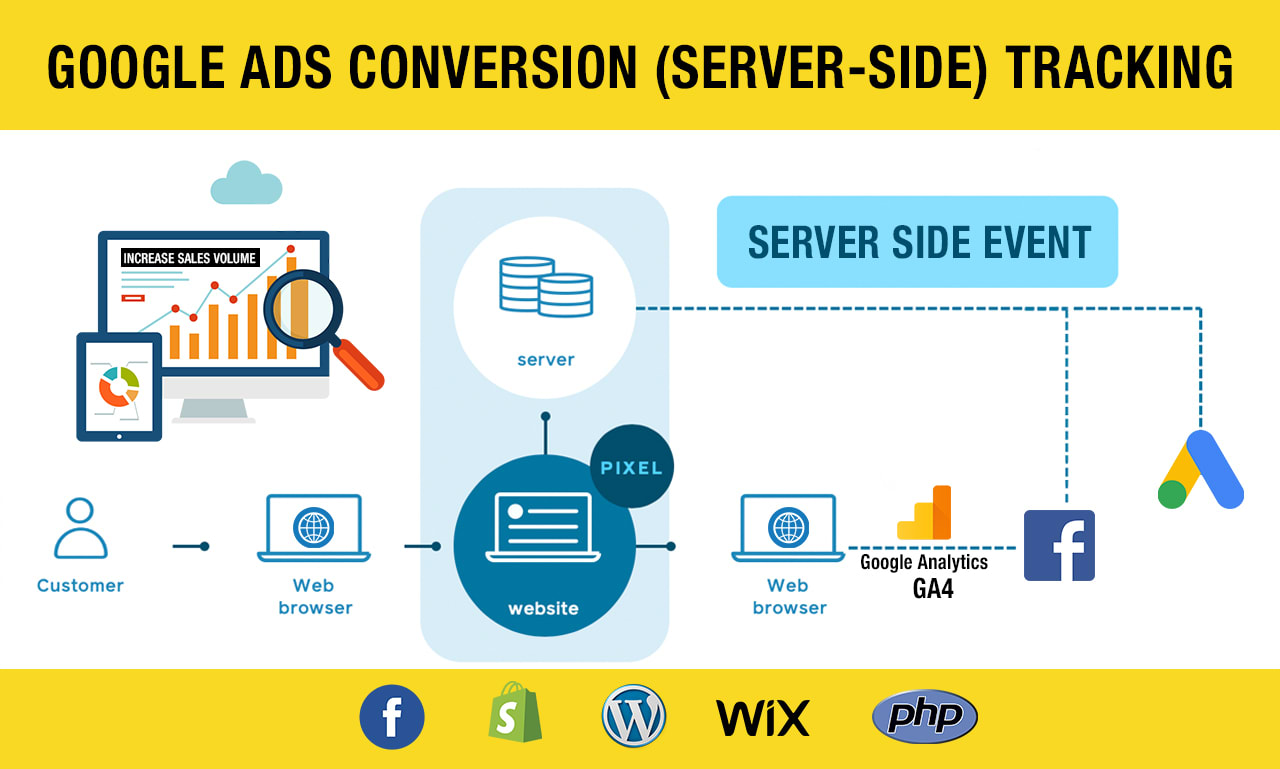
Server-side tracking records purchases directly from your Shopify backend and sends them to Google Ads as first-party conversions. This bypasses ad blockers, reduces data loss from consent issues, and dramatically improves attribution accuracy.
Instead of guessing, Google receives real purchase events tied to real ad clicks.
How wetracked.io Fixes Google Ads Shopify Tracking
wetracked.io tracks Shopify sales server-side and pushes accurate conversion data directly into Google Ads.
Because the data comes from the server instead of the browser, conversions are captured even when users block tracking or move between devices. This gives Google’s bidding algorithm clean, consistent signals to optimize against.
There’s no need to reconcile dashboards or second-guess numbers. The corrected data appears directly inside your Google Ads account, where it actually matters.
According to wetracked.io’s product documentation, merchants typically see a significant jump in attributed conversions and more stable Smart Bidding performance once server-side tracking is in place .
Why Accurate Google Ads Tracking Unlocks Scale
When Google finally sees all conversions, things change fast.
Bidding becomes more predictable. ROAS stabilizes. Campaigns that previously looked unprofitable suddenly make sense. Scaling stops feeling risky, because performance is based on real revenue, not partial data.
This is especially important for Shopify brands running Performance Max, Shopping, or broad match search campaigns, where Google relies heavily on conversion feedback loops.
When You Should Rethink Your Current Setup
If your Shopify revenue is consistently higher than what Google Ads reports, if Smart Bidding underperforms, or if scaling increases spend without returns, the issue is not your ads.
It’s your tracking.
At that point, tweaking attribution windows or conversion settings won’t fix the core problem. You need a different tracking foundation.
Final Takeaway
The default Google Ads Shopify integration was built for a web that no longer exists.
In 2026, accurate conversion tracking requires server-side, first-party data that survives privacy restrictions and ad blockers. Without it, Google Ads will always optimize on incomplete information.
If you want to track every sale correctly and let Google’s algorithm work as intended, upgrading your tracking setup isn’t optional. It’s the baseline for profitable growth.
Understanding and implementing the Google Ads pixel can significantly bolster a business's online advertising strategy. The ability to track detailed user interactions and conversions allows for more informed marketing decisions, leading to better-targeted ads and optimized spending. Tools like Wetracked.io enhance this process by providing high accuracy in tracking and data alignment. Moreover, resources such as Ad Taxi's tutorial and the Google Ads Pixel Helper tool can aid in troubleshooting and ensuring proper setup. By leveraging these technologies, businesses can align their digital efforts with their broader goals, driving more effective and efficient advertising campaigns.


