Pinterest Conversion Tracking for Ecommerce: Setup Guide (2026)
Unlocking Pinterest's potential for businesses relies on effective conversion tracking. The Pinterest Conversion Tracker enables precise measurement and optimization of marketing efforts by tracking user actions on websites post-interaction with Pins. This tool helps in targeting, improving ROI, and refining strategies. Utilizing the Pinterest Tag and conversion insights, advertisers gain comprehensive data from a single dashboard, ensuring informed, data-driven decisions for future campaigns. Accurate conversion tracking is vital for measuring campaign effectiveness and optimizing resources.

Pinterest continues to be a strong intent-driven channel for ecommerce in 2026, especially for brands in home, fashion, beauty, food, and lifestyle. But many advertisers quietly struggle with the same issue: Pinterest drives sales, yet conversions don’t fully show up in reporting.
The reason is almost always tracking.
This guide explains how Pinterest conversion tracking works today, how to set it up correctly for ecommerce, and how to avoid the data gaps that limit optimization and scale.
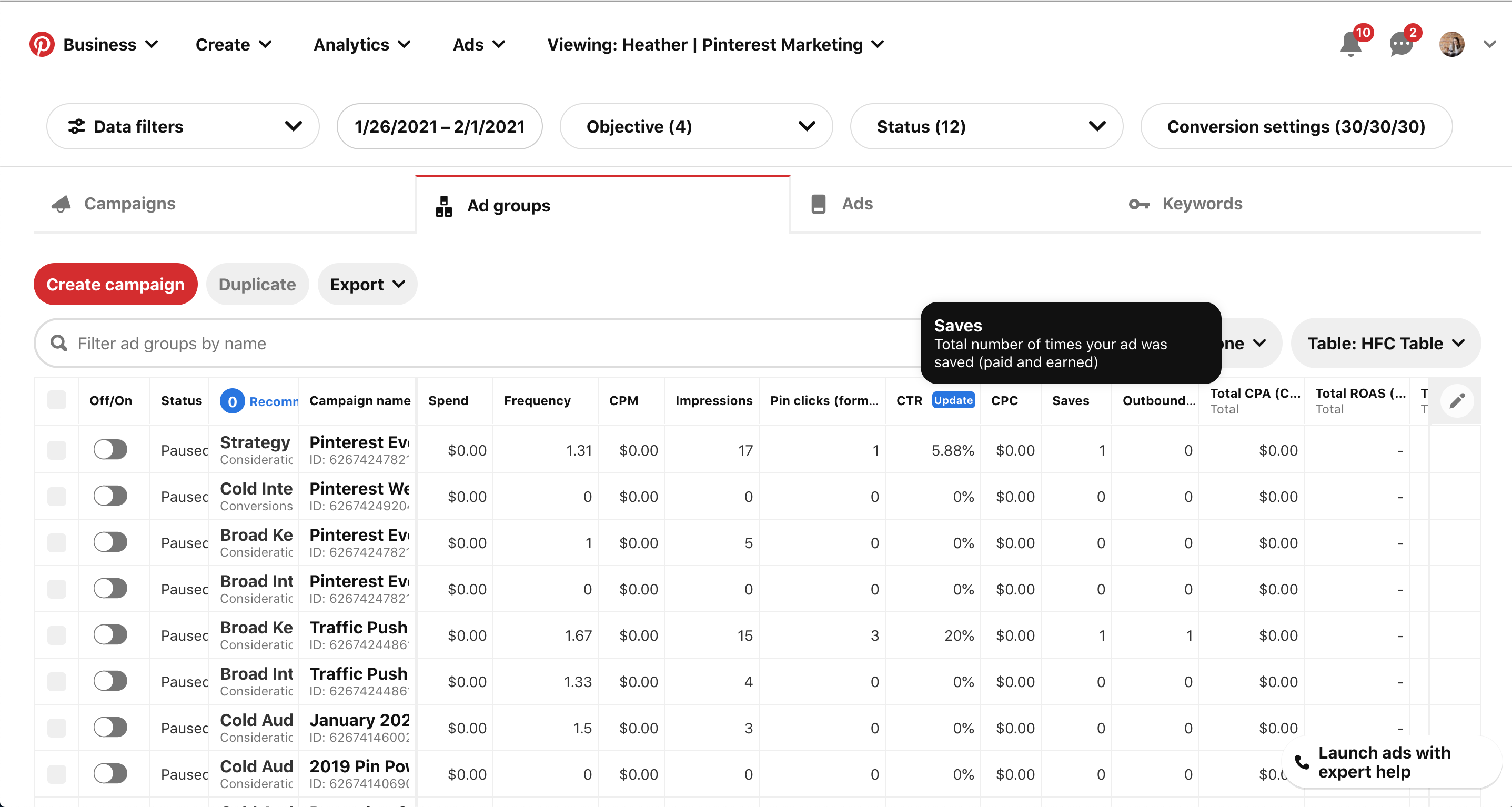
What Pinterest Conversion Tracking Actually Does
Pinterest conversion tracking connects actions on your ecommerce store, such as purchases or add-to-cart events, back to Pinterest Ads Manager.
When tracking is set up correctly, Pinterest can:
- Attribute sales to ads
- Optimize delivery toward converting users
- Build retargeting and actalike audiences
- Report ROAS and conversion metrics accurately
If tracking is incomplete, Pinterest still sends traffic, but the algorithm has little feedback to learn from.
Why Pinterest Tracking Breaks for Many Ecommerce Stores
Pinterest tracking traditionally relies on the Pinterest Tag, a browser-based script similar to other ad pixels.
In 2026, this approach has clear limitations.
More users browse on mobile devices with restricted tracking. Consent banners and ad blockers prevent the tag from firing. Cross-device journeys are common, especially for Pinterest users who browse ideas first and purchase later.
The result is underreported conversions and delayed attribution, even when Pinterest is genuinely influencing purchases.
The Pinterest Tag: The Starting Point
The Pinterest Tag is required for any conversion tracking.
It’s a JavaScript snippet placed on your website that tracks standard events such as page views, add to cart, checkout, and purchase.
For Shopify stores, the tag can be installed using Pinterest’s native Shopify app or manually added to the theme. The native app is the easiest option and covers most standard ecommerce events.
However, the tag alone is not enough for full accuracy.
Setting Up Pinterest Conversion Tracking on Shopify
For most ecommerce stores, setup follows a simple baseline.
You install the Pinterest app from the Shopify App Store, connect your Pinterest Ads account, and allow data sharing. Shopify then automatically sends standard events like PageVisit, AddToCart, Checkout, and Purchase.
Once connected, you verify events inside Pinterest Ads Manager using the Tag Helper or Events Overview.
At this stage, conversions should appear, but they will almost always be incomplete.
Why Browser-Based Pinterest Tracking Falls Short in 2026
Pinterest users often browse in discovery mode. They pin, save, and return later, sometimes on a different device.
Browser-based tracking struggles to connect those dots. If the Pinterest Tag doesn’t fire at checkout, the conversion is lost.
This is why many ecommerce brands see Pinterest driving “assisted” conversions that never fully show up in Ads Manager.
Pinterest plays an outsized role in apparel ecommerce because shoppers frequently use the platform for inspiration, outfit planning, and product discovery before purchasing. That longer discovery cycle creates attribution gaps if conversion tracking is incomplete, especially for brands managing complex apparel fulfillment operations and high return volumes.
Server-Side Tracking and Pinterest
Unlike some other platforms, Pinterest’s server-side capabilities are more limited, but first-party data still plays a growing role.
Sending enriched, reliable conversion data improves attribution and gives Pinterest better signals for optimization, even if the final click happens days later.
The closer the conversion event is to the ecommerce backend, the more reliable it becomes.
What Good Pinterest Conversion Tracking Enables
When tracking works properly, Pinterest becomes much easier to scale.
Campaigns stabilize because the algorithm can see which pins and audiences actually lead to purchases. Retargeting pools grow faster. Actalike audiences become more accurate.
Most importantly, ROAS reporting becomes directionally trustworthy instead of guesswork.
Common Mistakes With Pinterest Tracking
One common mistake is assuming Pinterest underperforms when conversions are simply missing.
Another is relying only on last-click attribution. Pinterest often plays an upper- and mid-funnel role, so delayed or assisted conversions matter.
Finally, many stores stack multiple tracking scripts that conflict or slow down the site without improving data quality.
How wetracked.io Improves Pinterest Conversion Tracking
Platforms like wetracked.io improve Pinterest tracking by fixing the data at the source.
Instead of relying only on browser tags, wetracked.io captures ecommerce events directly from the store backend and distributes clean conversion data to multiple ad platforms, including Pinterest.
This approach:
- Reduces data loss from ad blockers
- Improves attribution accuracy
- Aligns reported conversions more closely with real revenue
- Gives Pinterest stronger optimization signals
According to wetracked.io’s documentation, backend-first tracking significantly improves visibility into channels that drive delayed or assisted conversions, such as Pinterest .
How to Verify Pinterest Tracking Is Working
Inside Pinterest Ads Manager, you should see conversions attributed to campaigns within a reasonable delay window.
Events should fire consistently, not sporadically. Shopify revenue and Pinterest-reported revenue won’t match exactly, but they should move in the same direction.
If Pinterest sends traffic but shows zero or near-zero conversions over time, tracking is almost always the issue.
Best Practices for Pinterest Conversion Tracking in 2026
Use the native Shopify integration as a baseline, but don’t rely on it alone for attribution accuracy.
Make sure your conversion windows reflect Pinterest’s longer discovery cycle. Avoid judging performance too quickly.
Most importantly, ensure your conversion data originates as close to the purchase event as possible.
Final Takeaway
Pinterest can be a highly profitable ecommerce channel in 2026, but only if it receives reliable conversion data.
Browser-based tracking alone no longer tells the full story. To scale Pinterest Ads with confidence, conversion tracking needs to survive privacy restrictions, delayed purchases, and cross-device behavior.
If Pinterest traffic converts but your reporting doesn’t reflect it, the fix isn’t better creatives. It’s better tracking.
Effective use of Pinterest's conversion tracking tools can significantly enhance marketing strategies. By leveraging the Pinterest Tag and analyzing conversion metrics, businesses can make data-driven decisions that optimize ad campaigns and improve ROI. The ability to track specific user actions enables precise targeting and better resource allocation. Additionally, adhering to data protection regulations and ensuring user privacy is crucial for maintaining trust. Utilizing available resources like the Pinterest Help Center and community forums can further support successful integration and troubleshooting, fostering continuous improvement in campaign performance.