How to Set Up First-Party Tracking on Shopify (2026)
Establishing first-party tracking on a Shopify platform is crucial for e-commerce businesses seeking accurate, direct customer data. This method enables merchants to gain valuable insights into customer behavior, supporting more informed business decisions and personalized marketing strategies. Tools like Google Tag Manager streamline the integration process, making it easier to configure tracking for various activities, including orders and sales.

If your Shopify analytics don’t match your ad platforms anymore, you’re not doing anything wrong. The tracking model most stores still use is outdated.
In 2026, first-party tracking is the foundation of reliable attribution. Cookies are blocked, browser signals are incomplete, and third-party scripts silently fail. The result is missing conversions, unstable ROAS, and ad algorithms optimizing on partial data.
This guide explains what first-party tracking actually means for Shopify, how to set it up, and what level of setup is realistic depending on your technical resources.
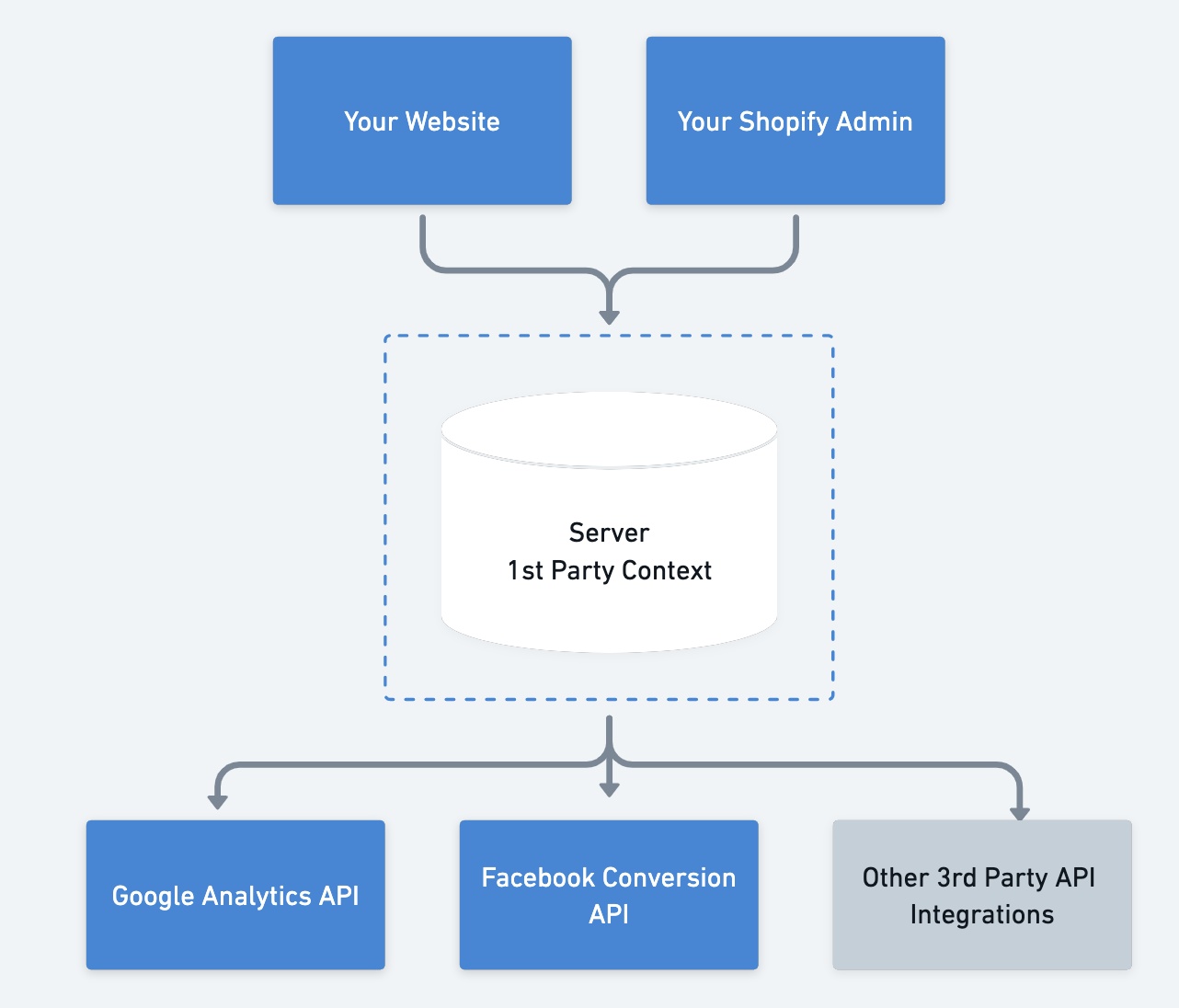
What First-Party Tracking Really Means (And What It Doesn’t)
First-party tracking means your store collects and controls its own data, instead of relying on third-party cookies or browser scripts owned by ad platforms.
In practice, that means conversion events originate from your Shopify backend, not from the visitor’s browser.
It does not mean:
- No pixels at all
- No analytics tools
- No consent requirements
It means your store is the source of truth, and platforms like Meta or Google Ads receive data from you, not the other way around.
Why Shopify Stores Lose Data Without First-Party Tracking
Most Shopify stores still depend on browser-based tracking.
A typical flow looks like this: a user clicks an ad, lands on the store, completes checkout, and a pixel fires on the thank-you page. That pixel depends on cookies, JavaScript, consent, and uninterrupted browser execution.
In 2026, that chain breaks often.
If any part fails, the conversion never reaches the ad platform. The order exists in Shopify, but it doesn’t exist for optimization.
That gap is why Shopify revenue and Ads Manager revenue no longer align for many stores.
What Changes When You Switch to First-Party Tracking
With first-party tracking, the conversion event is generated when the order is created in Shopify itself.
That event is then sent server-to-server to ad platforms. No browser dependency. No blocked scripts. No missing thank-you page loads.
This fundamentally changes three things:
- Attribution becomes more complete
- Algorithms receive stronger feedback
- Reporting stabilizes
You’re no longer guessing how much data you’re missing.
The Three Ways to Set Up First-Party Tracking on Shopify
There isn’t just one way to do this. The right setup depends on how much control and accuracy you need.
Option 1: Shopify Native Server-Side Tracking (Baseline)
Shopify offers built-in server-side tracking through its native integrations, especially for Meta.
When data sharing is set to “Maximum” in the Facebook & Instagram sales channel, Shopify sends server-side events using Conversion API.
This is the easiest way to get started and requires no custom development. However, coverage is limited to predefined events and platforms, and customization is minimal.
It’s a solid baseline, but not full first-party control.
Option 2: Google Tag Manager Server-Side
Some stores implement first-party tracking using server-side Google Tag Manager.
In this setup, browser events are forwarded to a server container, which then sends data to ad platforms.
This reduces some data loss, but it still depends on frontend events firing first. If the browser never sends the event, the server never sees it.
It’s an improvement over pixel-only tracking, but still not true backend-first tracking.
Option 3: Backend-First First-Party Tracking (Most Reliable)
The most accurate setup uses Shopify itself as the event source.
Purchase, checkout, and cart events are captured directly from Shopify’s backend, enriched with first-party identifiers, and sent server-side to ad platforms.
This approach does not rely on browser behavior at all for core conversions. It is the closest thing to full first-party tracking for ecommerce.
What Events Should Be First-Party Tracked
At minimum, purchase events should always be first-party.
For many stores, cart creation, checkout start, and revenue events are also worth tracking server-side, especially if abandoned cart flows or ad optimization depend on them.
The more critical the event is to revenue or optimization, the less it should depend on browser scripts.
Why First-Party Tracking Improves Ad Performance
Ad platforms optimize on feedback loops.
When conversions are delayed, underreported, or missing, algorithms learn the wrong patterns. This leads to unstable performance, poor scaling behavior, and misleading ROAS.
First-party tracking sends faster, cleaner signals. That improves learning speed, audience expansion, and budget efficiency.
This is especially important for automated campaign types like Advantage+ and Performance Max.
How wetracked.io Implements First-Party Tracking on Shopify
Platforms like wetracked.io are built specifically to make first-party tracking practical for Shopify stores.
Instead of asking merchants to manage servers, containers, and event pipelines, wetracked.io captures conversion events directly from the Shopify backend and pushes them server-side to ad platforms.
Because the data is first-party and backend-generated, it:
- Bypasses ad blockers
- Works across devices
- Survives iOS privacy restrictions
- Aligns Ads Manager data with real revenue
According to wetracked.io’s documentation, stores typically see a large recovery of previously untracked conversions once backend-first first-party tracking is enabled .
Common Misconceptions About First-Party Tracking
First-party tracking does not mean “tracking without consent.” Privacy laws still apply.
It also doesn’t automatically fix attribution windows or reporting differences between platforms. It improves the input quality, not the interpretation layer.
And finally, it’s not just for large enterprises anymore. Shopify-focused tools have made it accessible without custom engineering.
When First-Party Tracking Is a Must-Have
If your Shopify revenue is consistently higher than what ad platforms report, if scaling campaigns causes performance to collapse, or if you don’t fully trust your analytics anymore, first-party tracking is no longer optional.
At that point, optimizing ads without fixing data is like tuning an engine with broken sensors.
Final Takeaway
In 2026, first-party tracking is the new baseline for Shopify stores that rely on paid traffic.
Browser-based tracking will continue to lose accuracy. Platforms will continue to automate more aggressively. The only stable foundation is owning your data at the source.
Whether you start with Shopify’s native tools or move directly to backend-first tracking, the goal is the same: make sure every real purchase becomes a reliable signal your marketing stack can learn from.
In conclusion, establishing first-party tracking on a Shopify platform is crucial for e-commerce businesses seeking accurate, direct customer data. This method enables merchants to gain valuable insights into customer behavior, supporting more informed business decisions and personalized marketing strategies. Tools like Google Tag Manager streamline the integration process, making it easier to configure tracking for various activities, including orders and sales. Properly configured first-party tracking ensures data accuracy and security, which is essential for optimizing store performance and enhancing marketing effectiveness. This approach ultimately leads to improved ROI and a competitive edge in the online marketplace.


.avif)


