How to Set Up Facebook Conversion API on Shopify (2026)
The challenges of traditional browser-based tracking in online advertising due to privacy measures like Apple's iOS 14 update. It introduces the Facebook Conversion API (FB CAPI) as a more reliable alternative for Shopify store owners, enhancing tracking accuracy from 40% to nearly 100%. The setup process is straightforward and can be done independently. For even more precise tracking, tools like wetracked.io are recommended. The article provides detailed steps for setting up FB CAPI on Shopify and emphasizes the importance of integrating advanced tracking tools to optimize marketing performance.
.avif)
If you’re still relying only on the Facebook Pixel to track purchases on Shopify, you’re leaving data and performance on the table. In 2026, browser-based tracking alone no longer captures enough conversions for Meta’s algorithm to optimize properly.
That’s why the Facebook Conversion API (CAPI) is no longer optional for Shopify stores that want stable ROAS and scalable Meta Ads.
This guide explains how Facebook Conversion API works on Shopify, the different setup options, how to implement it correctly, and where most merchants unknowingly go wrong.
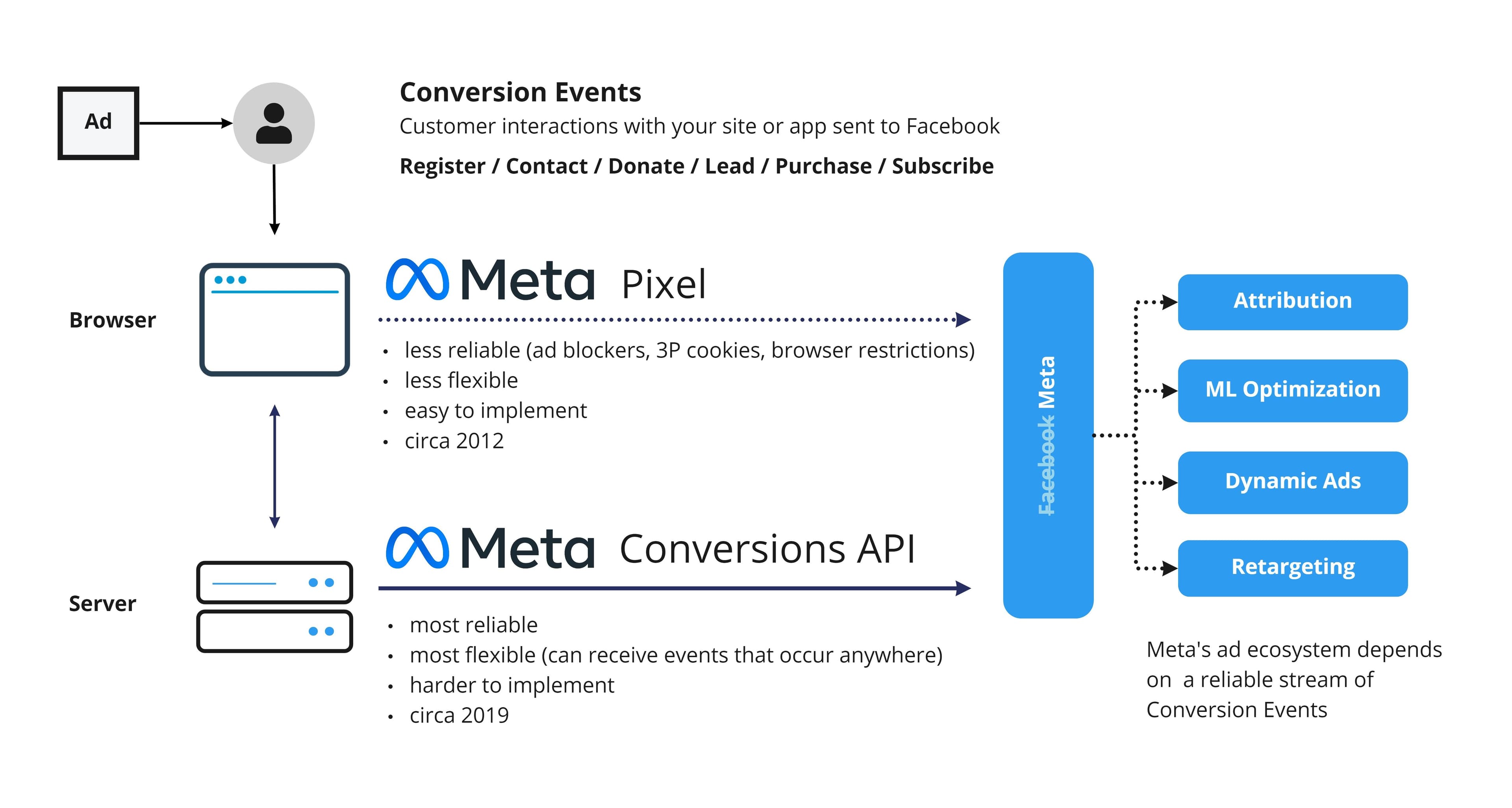
What Facebook Conversion API Actually Is
Facebook Conversion API allows Shopify stores to send conversion events directly from the server to Meta, instead of relying only on events fired in the customer’s browser.
With the Facebook Pixel, a purchase event must fire on the thank-you page. If that request is blocked by iOS privacy rules, consent banners, or ad blockers, Meta never sees the conversion.
With Conversion API, the purchase event is sent server-to-server. This makes tracking far more reliable and gives Meta stronger signals to optimize ad delivery.
The pixel and Conversion API are designed to work together. The pixel captures what it can in the browser, while CAPI fills in the gaps.
Why Facebook Conversion API Matters for Shopify in 2026
Shopify stores face a perfect storm of tracking issues.
More traffic comes from iOS devices. More users block tracking. Checkout flows are faster and more fragmented. As a result, a growing share of real purchases never reach Meta Ads Manager.
This directly affects performance. Meta’s algorithm optimizes based on the data it receives. Missing purchase events lead to weaker learning, unstable campaigns, and lower ROAS.
Conversion API helps restore those missing signals.
Clean data is only half the battle the creative matters too, and advanced adspy analytics from Winning Hunter reveal which ads are already scaling in your niche so you can feed Meta proven winners.
The Three Ways to Set Up Facebook Conversion API on Shopify
There are three common approaches to implementing CAPI on Shopify. All work technically, but they differ greatly in reliability and complexity.
Option 1: Shopify’s Native Facebook Integration
Shopify offers a built-in Facebook and Instagram integration through the Meta sales channel. When data sharing is set to “Maximum,” Shopify automatically sends server-side events to Meta.
This is the easiest setup and works reasonably well for many stores. Shopify handles event mapping, deduplication, and ongoing updates.
However, this setup still has limitations. Event coverage is fixed, customization is limited, and some edge cases such as custom checkouts or advanced funnels may not be fully captured.
Option 2: Google Tag Manager + Conversion API
Some merchants use Google Tag Manager to send events to Meta via Conversion API.
This usually involves:
- GA4 events firing in the browser
- Events forwarded to a server-side GTM container
- GTM sending events to Meta via CAPI
While more flexible than Shopify’s native setup, this approach still depends heavily on frontend events. If the browser never fires the event, the server never receives it.
It’s an improvement over pixel-only tracking, but not a complete fix for data loss.
Option 3: Backend-First Server-Side Tracking (Most Reliable)
The most accurate approach is sending Conversion API events directly from Shopify’s backend, independent of browser behavior.
This means the purchase event originates from the actual order creation in Shopify, not from a page load or script. That event is then enriched with first-party data and sent directly to Meta.
This approach recovers the highest number of missing conversions and provides the cleanest data for optimization.
Step-by-Step: Setting Up Facebook Conversion API via Shopify Native Integration
If you want the simplest starting point, Shopify’s native setup is the fastest.
Inside Shopify, go to your admin panel and open Settings, then Apps and sales channels. Select Facebook & Instagram and open the sales channel.
Navigate to data sharing settings and connect your Meta account. Choose or create a pixel and set data sharing to Maximum. This enables server-side event forwarding.
Once connected, Shopify automatically sends standard ecommerce events such as ViewContent, AddToCart, InitiateCheckout, and Purchase via Conversion API.
You should then verify events inside Meta Events Manager.
How to Verify Your Conversion API Setup
Inside Meta Events Manager, select your dataset and open the Events tab.
You should see events labeled as coming from Server or Server + Browser. If you only see browser events, Conversion API is not working.
Deduplication is also critical. Meta expects the same event ID to be sent for both pixel and server events. Shopify handles this automatically in native setups, but custom setups often get this wrong.
Common Mistakes Shopify Merchants Make
A frequent mistake is assuming Conversion API is working just because the pixel is active. Pixel activity does not guarantee server-side tracking.
Another issue is relying on Conversion API triggered by browser or GA4 events. This still leaves gaps when frontend tracking fails.
Many stores also overestimate how much Conversion API alone can fix. If the underlying event source is unreliable, CAPI can’t magically recreate missing data.
Why Conversion API Alone Is Not the Full Solution
Conversion API improves delivery, but it does not automatically guarantee full attribution accuracy.
If Meta receives only partial purchase data, even server-side, optimization still suffers. What matters is where the event originates.
For ecommerce, the most reliable source is the Shopify backend itself.
How wetracked.io Improves Facebook Conversion API on Shopify
Platforms like wetracked.io take Conversion API further by making Shopify the single source of truth.
Instead of depending on frontend scripts or limited native events, wetracked.io captures every order server-side, enriches it with first-party data, and sends it directly into Meta Ads via Conversion API.
This means:
- Purchases are tracked even when browsers block scripts
- Event match quality improves
- Meta receives faster, cleaner feedback signals
- Reported conversions align more closely with real revenue
According to wetracked.io’s product documentation, merchants typically recover a large portion of conversions that were previously missing due to iOS restrictions and ad blockers .
When You Should Upgrade Your Setup
If your Shopify revenue consistently exceeds what Meta reports, if iOS traffic underperforms, or if scaling campaigns causes ROAS to drop, your tracking setup is holding you back.
In those cases, adding Conversion API through the easiest method is a good start, but backend-first tracking delivers the biggest improvement.
Final Takeaway
Setting up Facebook Conversion API on Shopify is a requirement in 2026, not an advanced optimization.
Shopify’s native integration is a solid baseline. GTM-based setups offer more flexibility. Backend-first server-side tracking delivers the highest accuracy.
If Meta Ads performance matters to your business, the goal isn’t just installing Conversion API. It’s ensuring that every real purchase becomes a reliable optimization signal Meta can actually learn from.
The Facebook Conversion API is essential for accurate tracking in the face of new privacy regulations and limitations of traditional tracking methods. Shopify store owners can independently set up FB CAPI to improve data accuracy. For superior tracking precision, tools like wetracked.io are suggested, offering resistance to ad blockers and enhancing the effectiveness of marketing campaigns. This approach ensures comprehensive data collection, vital for optimizing advertising strategies and maximizing return on investment.


