Track Conversions in Meta Events Manager (2026): Setup & Troubleshooting
Tracking conversions within Meta Events Manager is vital for optimizing ad campaigns and maximizing ROI. Tools like the Conversions API and Meta Pixel help businesses monitor visitor activities across multiple touchpoints, enhancing their marketing strategies. Accurate conversion tracking allows for data-driven insights to refine campaigns. Setting up Meta Events Manager includes integrating elements like Meta Pixel and Facebook SDK for iOS and Android. For ecommerce, tools like wetracked.io offer one-click integration, significantly improving event matching and tracking accuracy. Monitoring and troubleshooting ensure data accuracy, while custom conversions tailor tracking to specific business goals.
If you run Meta Ads and don’t fully trust your conversion data, the first place to look is Meta Events Manager. In 2026, this tool is no longer just a diagnostics screen. It’s the control center that determines whether Meta’s algorithm can actually learn from your sales.
This guide explains how conversion tracking works inside Meta Events Manager, how to set it up correctly, how to read what you’re seeing, and why many ecommerce stores still miss conversions even when “everything looks fine.”
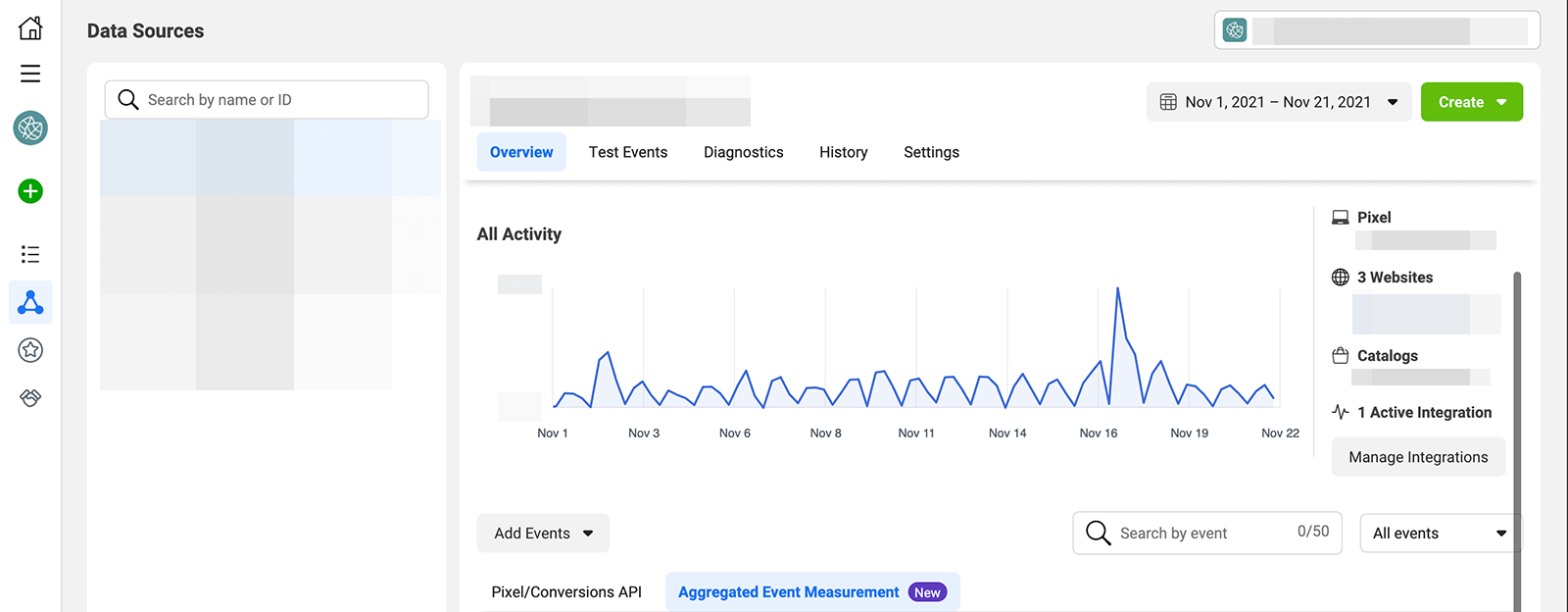
What Meta Events Manager Actually Does
Meta Events Manager is where Meta collects, processes, and validates all conversion events coming from your website, app, or server.
Every Purchase, AddToCart, or ViewContent event used for optimization flows through Events Manager first. If an event doesn’t show up here, Meta Ads cannot use it for delivery or bidding.
Events Manager is not just reporting. It is the gatekeeper.
The Two Ways Meta Receives Conversion Events
In 2026, Meta can receive events in two ways.
The first is browser-based tracking, typically via the Meta Pixel. These events fire in the user’s browser when a page loads or an action happens.
The second is server-side tracking, usually through the Conversion API. These events are sent directly from your server or ecommerce backend to Meta.
Most healthy setups use both. The pixel captures what it can. The server fills in what the browser misses.
Step 1: Check Your Data Source (Dataset)
Inside Events Manager, the first thing to verify is your dataset, previously called a pixel.
Open Events Manager, select the correct dataset, and confirm it is connected to the right ad account and domain. Many tracking issues are simply caused by events being sent to the wrong dataset.
If you see no recent activity at all, tracking is not working at the most basic level.
Step 2: Verify Events Are Coming In
Go to the Events tab and look at incoming events.
You should see standard ecommerce events such as ViewContent, AddToCart, InitiateCheckout, and Purchase. For each event, Meta shows whether it came from the browser, the server, or both.
If you only see browser events, you are still vulnerable to data loss. If you see server events, Conversion API is active.
Consistency matters more than volume. Sporadic events usually indicate tracking gaps.
Step 3: Use Test Events (The Right Way)
The Test Events tool allows you to simulate actions and see events arrive in real time.
Trigger a test by visiting your store through the test link or performing actions manually. You should see events appear instantly, labeled as browser, server, or both.
If events show up here but not in regular reporting, the issue is often deduplication or attribution, not firing.
Step 4: Check Event Match Quality
Event Match Quality tells Meta how confidently it can link an event to a real person.
Higher match quality comes from sending first-party identifiers such as email, phone number, IP address, and user agent. Poor match quality limits optimization, even if events are firing.
In 2026, match quality matters more than raw event count. A smaller number of well-matched events often outperforms a larger number of weak ones.
Step 5: Confirm Deduplication Is Working
When you use both pixel and server-side tracking, Meta expects the same event to arrive twice, once from the browser and once from the server.
Meta uses an event ID to deduplicate those signals into a single conversion. If event IDs don’t match, Meta may double-count or discard conversions.
Inside Events Manager, look for warnings related to deduplication. These are common and often overlooked.
Step 6: Review Aggregated Event Measurement
Due to iOS privacy rules, Meta limits which events can be used for optimization.
Inside Events Manager, check Aggregated Event Measurement and confirm that Purchase is prioritized correctly. Changes here can affect reporting and optimization for days.
If Purchase is not prioritized, Meta may optimize on lower-value events instead.
Why Conversions Still Go Missing (Even When Setup Looks Correct)
Many advertisers reach this point and still see fewer conversions than Shopify or WooCommerce reports.
The reason is usually event origin.
If your Purchase event depends on a browser thank-you page firing, Conversion API cannot recover it when that page never loads or tracking is blocked. The server never receives the signal.
That’s why many setups look correct in Events Manager but still underreport revenue.
How Backend-First Tracking Changes Events Manager
When conversion events originate directly from the ecommerce backend, Events Manager becomes far more reliable.
Purchase events arrive as server events consistently, with high match quality and proper deduplication. Gaps caused by ad blockers or consent disappear.
This is why backend-first tools like wetracked.io focus on making the store the source of truth, not the browser.
Instead of hoping the pixel fires, every real order is sent to Meta via Conversion API automatically. This typically recovers a large share of previously missing conversions and stabilizes Meta optimization signals.
How to Know If Your Tracking Is “Good Enough”
Your tracking is likely insufficient if:
- Shopify revenue is consistently higher than Meta-reported revenue
- iOS traffic barely converts
- Performance drops when you scale
- Events appear sporadically in Events Manager
Healthy tracking shows steady server events, good match quality, and minimal warnings.
Common Mistakes to Avoid
One common mistake is treating Events Manager as a one-time setup. It should be checked regularly.
Another is assuming that seeing some Purchase events means tracking is solved. Partial data still leads to poor optimization.
Finally, many teams spend time tweaking creatives and bids while ignoring broken feedback loops. Without clean conversion data, optimization is guesswork.
Final Takeaway
Meta Events Manager is not just a reporting tool. It is the foundation of how Meta Ads learn and optimize in 2026.
If conversions are missing or unreliable here, no campaign structure or creative tweak will fix performance.
The goal is simple: make sure every real purchase shows up in Events Manager as a clean, high-quality server event. When that happens, Meta’s algorithm finally has the information it needs to work in your favor.
Understanding and implementing Meta Events Manager for conversion tracking can significantly enhance a business's advertising performance. By accurately tracking user interactions and conversions, businesses can optimize their ad campaigns, improve targeting, and achieve higher ROI. Tools like the Meta Pixel and Conversions API provide detailed insights into user behavior, enabling better-informed decisions. Proper setup and verification of these tools ensure accurate data collection, crucial for refining marketing strategies. Additionally, leveraging advanced tracking strategies like server-side tracking and aggregated event measurement can further optimize conversions. Adhering to data privacy regulations and performing regular event reviews are essential for maintaining compliance and data accuracy. Integrating Meta Events Manager with other Meta tools like Audience Insights and Meta Business Suite can streamline operations and enhance campaign effectiveness. Employing advanced tracking solutions like wetracked.io can boost tracking accuracy, making it a valuable resource for eCommerce businesses.